

| May 6, 2026
- Why Docling
- Embedding: What is happening?
- CrewAI: Setting up and retrieving knowledge
- Local LLM and Pydantic validation
- Conclusions
- References
This is a great example of “making AI work for you”. It replaced a manual extraction step and built a framework that is reusable across different problem spaces. In this article, we discuss getting the most out of CrewAI and RAG search/retrieval.
Using CrewAI [1] on a recent project, we discovered a few settings that significantly helped improve accuracy when building local data extraction. We thought they were well worth sharing. The task was simple: extract structured data from historic PDF reports, but the data could not leave the site.
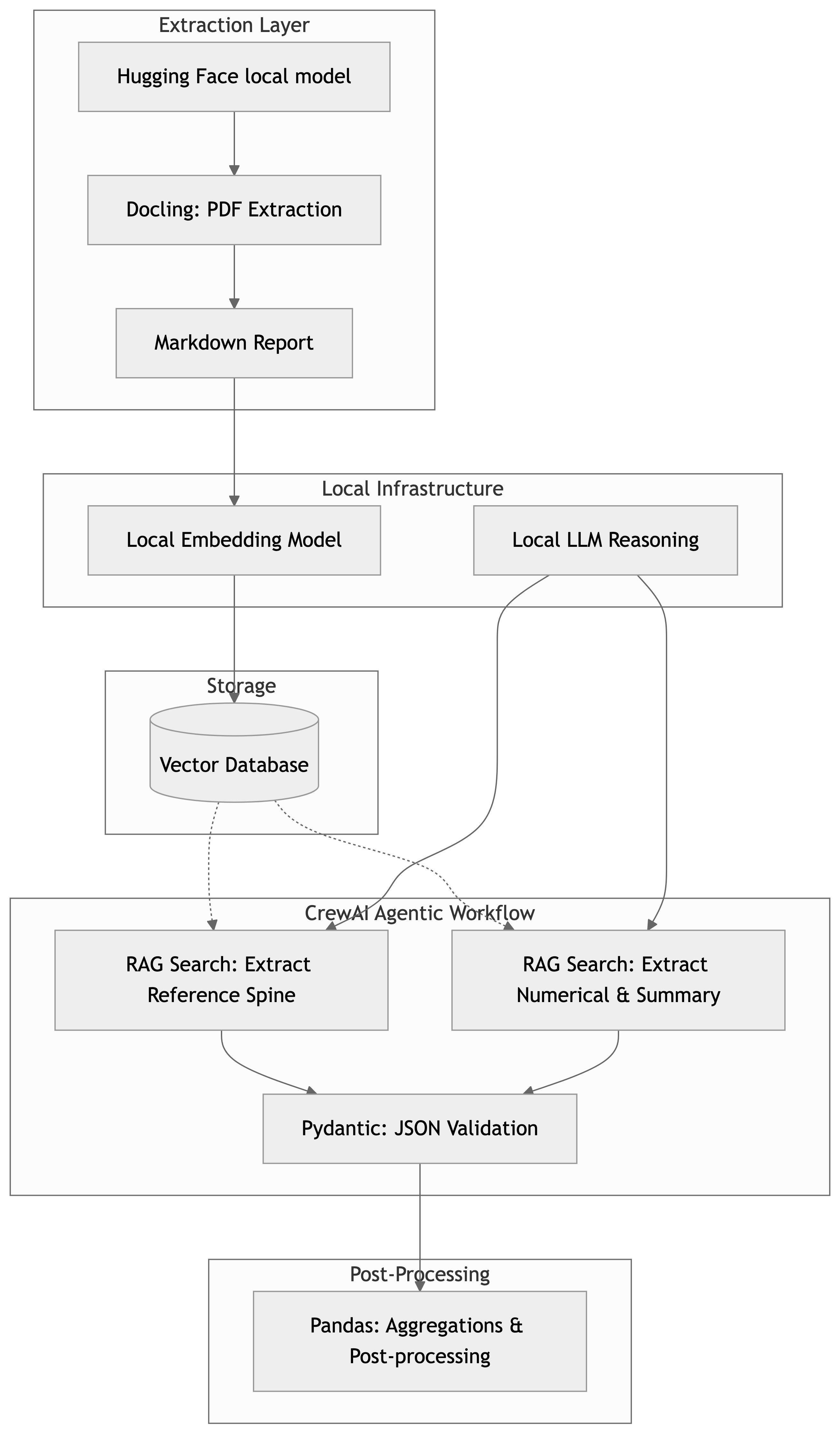
Figure 1 presents an overview of the workflow. It is a fairly standard Retrieval-Augmented Generation (RAG) solution. In the following sections, we discuss the implementation, our findings, and some of the settings we discovered that impacted accuracy.
Why Docling
The RAG search implementation in CrewAI is capable of processing PDFs directly, so why use Docling [2] at all? The simple answer is that we did both, and Docling provided more accurate results. The reason for this goes to the heart of the solution developed: we need to make the best use of the available context window.
The source PDFs are 30-100MB, but after processing with Docling, they drop to 200-900KB. We are much more interested in extracting data from tables and text, but we still have access to each image. By preprocessing with Docling, the chunks we embed are more information-rich.
Embedding: What is happening?
The core of RAG search and retrieval is embedding:
- We take chunks of the documents.
- We send them to the embedding model to convert text into numerical vectors.
- We store the vectors.
For this to be useful, we have the retrieval side:
- We take the prompt and context to create a query and fetch relevant vectors.
I could write an entire article on chunking; in many ways, it is the fundamental unit of work for information retrieval and unstructured data.
CrewAI: Setting up and retrieving knowledge
In CrewAI, there are a few ways to instrument embedding, but perhaps the most mature is by using
Knowledge. We can set up Knowledge scoped either at the Crew level or for each Agent. An example
follows.
knowledge_sources=[
    TextFileKnowledgeSource(
        file_paths=[
            "my_text_file.md",
        ],
        collection_name="my_collection_name",
        chunk_size=4092,
        chunk_overlap=128,
        metadata={
            'key': 'value'
        }
    ),
]
Note particularly chunk_size and chunk_overlap; these describe how we will segment and
embed our documents.
On the retrieval side, each agent has the following configuration:
from crewai.knowledge.knowledge_config import KnowledgeConfig

knowledge_config = KnowledgeConfig(
  results_limit=10,      # Maximum vectors to return
  score_threshold=0.5    # Search score threshold below which to ignore chunks
)

agent = Agent(
    ...
    knowledge_config=knowledge_config
)
The agent knowledge configuration is critical, and the default of 3 results is very conservative. Of all the configuration changes made, tuning this had by far the greatest impact. In our application, relevant chunks are scattered throughout the document. The default settings are designed to make the agent framework stable in potentially resource-constrained environments.
There is no one-size-fits-all here; my settings won’t work universally, as we are balancing:
- The number of vectorized chunks that can fit in the context window.
- The other prompt context that also needs to fit in the context.
- How relevant chunks may be distributed throughout our documents.
Use your model’s context wisely.
Local LLM and Pydantic validation
Pydantic is the standard for AI validation; the benefit in this design is that downstream applications know exactly what to expect. A great feature in CrewAI is that Field descriptions are part of the prompt’s context. By developing a good schema, we improve both extraction reliability and downstream application compatibility.
More complex schemas require a more powerful model and more context to validate correctly. You can work around this slightly, and the design presented above gives a clue as to how: we separate the reference spine. Most extractions have some reference (e.g., “tell me about all the People,” “find all the Things,” etc.). Using this, we can break the problem down. CrewAI provides Flows and recommends a “Flow-first” approach that can construct complex schemas step-by-step.
Conclusions
There are many settings to consider when deploying local models and applications. The optimum deployment will depend on the available hardware, as we are constantly trading context availability for task complexity and result accuracy. This requires some tuning and forethought, but achieving reliable and consistent extraction that won’t break downstream applications on local models is practical even on quite modest hardware. The prototypes here were developed on a MacBook Pro. The key to design and engineering remains the same: manage resources efficiently.
If you need reports extracted into structured data for analysis, we can help you automate that process and save significant time on manual extraction.
References
[1] CrewAI, Agentic AI framework built on LangChain. n.d.
[2] Docling, converting PDF to markdown with tables. n.d.
[3] Doclings Hugging Face models. n.d.